
A hacked WordPress site rarely looks the way it does in the movies — there's no blinking "you've been hacked" banner. In most cases everything looks completely normal: the site loads, the store takes orders, the admin panel works fine. Malware runs quietly in the background until Google does the noticing for you, blocking the site with a "This site may harm your computer" warning.
Why infections go unnoticed for so long
Modern WordPress malware rarely breaks a site in an obvious way — that would give the attacker away too fast. Instead, the code behaves selectively: it shows spam content only to search engine crawlers, redirects only a fraction of visitors (say, from mobile ad traffic) to shady destinations, or simply waits until the server can be used to send spam or attack other sites. The site owner browsing from their own computer usually sees nothing suspicious at all.
The most common types of WordPress infections
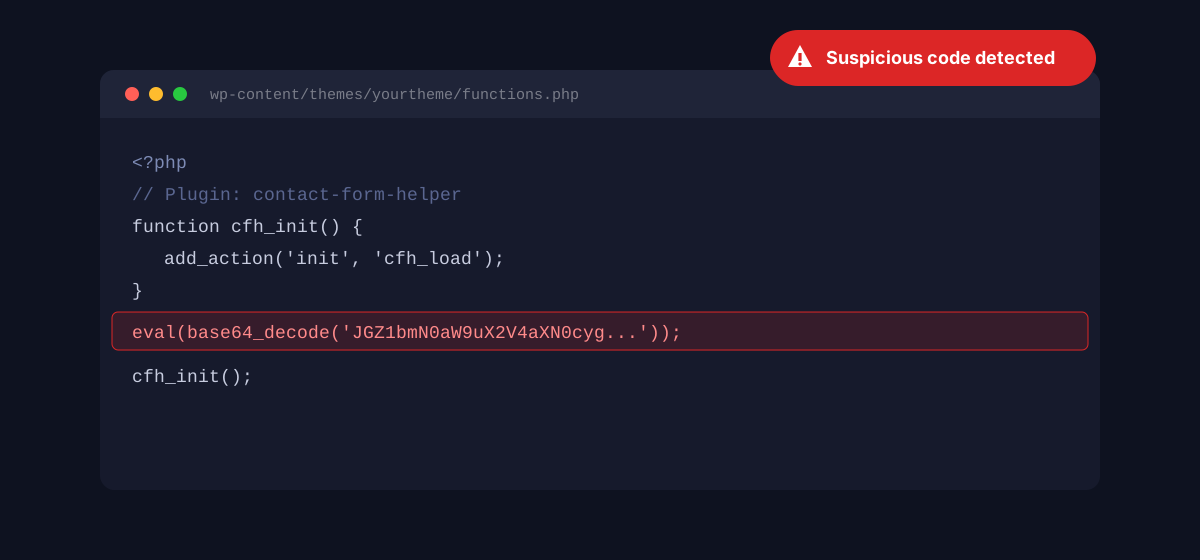
- Injected eval+base64 code — an obfuscated PHP snippet added to theme or plugin files that, once decoded, executes arbitrary commands from the attacker.
- Backdoors — a hidden file (often with a name deceptively similar to WordPress core files) that gives the attacker access even after passwords are changed.
- SEO spam / cloaking — the site serves Googlebot hundreds of pages advertising pharmaceuticals, casinos, or counterfeit goods, invisible to regular visitors.
- Malicious redirects — clicking a link on the site (or simply opening it on a phone) sends some visitors to fake "prize" pages or malware installers.
- Fake login forms — a phishing overlay mimicking the WordPress admin panel or a payment gateway, capturing login credentials or card details.
How Google treats an infected site
Google Safe Browsing scans billions of URLs, and once it finds malicious code, it flags the site with a warning visible in Chrome, Firefox, and search results: "This site may harm your computer" or "Deceptive site ahead." The effect is immediate and painful:
- organic traffic drops to near zero — most users won't click through a warning to "visit this unsafe site anyway,"
- Search Console reports a security issue, and the site can be temporarily removed from the index,
- clearing the warning requires cleaning the infection and manually requesting a review from Google — which can take anywhere from a few days to a few weeks.
In other words: by the time Google notices and blocks traffic, the infection may have already been sitting on your server for weeks, sending spam or stealing your store's customer data.
Warning signs you can check yourself
- A new administrator account you didn't create — check the users list in your dashboard.
- Unusual files in theme or plugin directories, modified on days nobody on your team published any changes.
- A sudden ranking drop for keywords unrelated to your business showing up in Google Search Console — a classic symptom of SEO spam.
- Unusual outbound traffic from the server, or CPU spikes with no obvious cause — this can mean the server is sending spam or taking part in an attack on other sites.
- Warnings in Search Console under "Security Issues" — if they've appeared there, Google has already confirmed the infection.
The catch is that most of these signs need to be actively checked — nobody does that manually every day, and as the example in our WordPress-down-at-night article shows, serious technical problems love to surface at the worst possible moment.
Why "the site loads fine" isn't enough
Basic uptime monitoring (a ping every few minutes, checking for a 200 OK response) won't catch malware at all — from that kind of test's perspective, an infected site looks perfectly healthy. It's the same gap we cover in our piece on WooCommerce monitoring, where Jetpack alone isn't enough — checking "does the site respond" is a completely different category from checking "is the site safe."
Catch malware before Google does
MonitorWWW.com runs 72 automated security checks on every monitoring cycle — including detection of injected code and suspicious file changes — and sends an SMS or Telegram alert before the infection ever reaches Google Safe Browsing.
See plans and pricingSummary
WordPress malware rarely announces itself — it runs quietly, selectively, and is usually noticed only once a search engine or an angry customer does it for you. Regular, automated security scanning is the only way to find out about an infection within hours, not weeks after it started.