
"We've got Jetpack, monitoring is covered" — that's one of the most common things we hear from WooCommerce store owners, right before it turns out checkout has been broken for two days while Jetpack was happily showing a green "site is up" the entire time.
This isn't Jetpack's fault — it does exactly what it was designed to do. The problem is that for an online store, that's not enough.
What does Jetpack Monitor actually check?
Jetpack Monitor (in its free version) works in a very simple way: every few minutes it sends a request to your homepage and checks whether the server responds. If the homepage returns a 200 OK, Jetpack considers everything fine — and only sends an email notification if the site stops responding entirely.
That's a basic but real layer of protection — better than no monitoring at all. The problem starts where this check's scope ends.
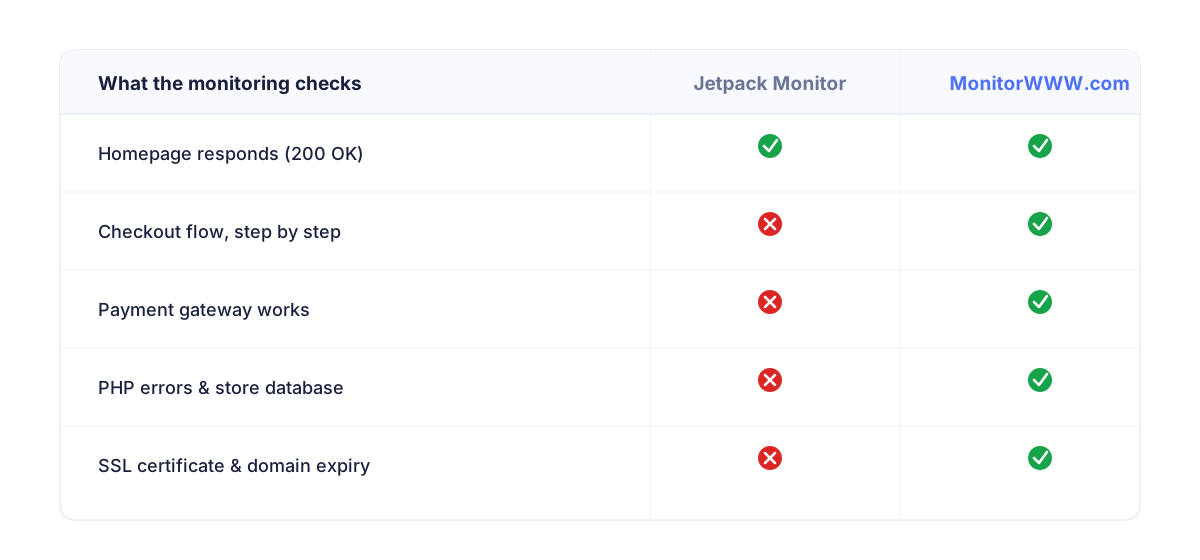
What Jetpack doesn't see in your store
1. Whether checkout actually works
This is the biggest gap. Your store's homepage can return 200 OK all day long while:
- the cart page throws a 500 error after a payment plugin update,
- one of your payment gateways (on the provider's side) stops responding,
- a plugin conflict makes the "Place order" button completely unresponsive.
From a basic uptime monitor's perspective, the store "is up". From your customers' — and your bank account's — perspective, the store isn't selling a single thing.
2. SSL certificate and domain expiry
Free uptime monitoring usually doesn't warn you in advance about an upcoming SSL certificate or domain expiry. For an online store, a "Your connection is not private" warning in the browser guarantees mass cart abandonment — often before anyone even realizes what happened.
3. Security: headers, blacklists, malware
Your store can be responding correctly (200 OK) while at the same time:
- being blacklisted by browsers or spam filters (which blocks transactional emails to your customers),
- having malicious code injected, invisible at first glance,
- missing basic HTTP security headers, increasing the risk of attacks.
None of these issues will be caught by a simple "ping" to the homepage.
4. PHP errors that don't take the whole site down
After a WooCommerce plugin or theme update, the site might keep loading just fine while generating PHP errors in the background — incorrectly calculating tax, failing to send order confirmation emails, or not updating stock levels. These are problems that cost real money, and basic uptime monitoring will never notice them.
5. How you get notified
Free Jetpack Monitor notifies you by email. That's fine if you check your inbox every hour. In practice, outage emails often land in spam, get buried among dozens of other messages, or simply aren't read until the morning — hours after the problem started costing you sales.
A real scenario: a payment plugin update on a Saturday night
An automatic update to a payment gateway plugin introduces a conflict with the theme. The homepage and product pages load without issue — Jetpack sees 200 OK and stays quiet. But the checkout page throws a critical PHP error. All Sunday, the store "works" according to monitoring, while in reality it's not accepting a single order. Monday morning, the owner finds out the hard way: from the complete absence of any new-order notifications. The cost: an entire weekend of traffic — often the busiest period of the week for e-commerce stores.
It's the same underlying mechanism we describe for WordPress in WordPress Site Down at Night? What to Do — except here the symptoms are much harder to spot, because the site "looks" fine.
What dedicated store monitoring adds
Proper WooCommerce monitoring needs to go beyond a simple "the site responds" check. In practice, that means:
- Platform detection — automatically recognizing WordPress/WooCommerce (and PrestaShop) and tailoring checks to your store,
- SSL and domain monitoring — advance warnings before expiry, not after the fact,
- A security score — checking security headers, exposed sensitive files, and blacklist status,
- TCP port monitoring — useful if your store relies on additional services (e.g. a separate database or inventory integrations),
- Multi-channel alerts — email, SMS and Telegram, so an outage notification reaches you regardless of whether you're staring at your inbox.
How much it's worth investing in fast detection comes down to a question we cover in another article: what does an hour of downtime actually cost you?
Jetpack and dedicated monitoring — together, not instead
This isn't about ditching Jetpack — it's still a useful tool for core WordPress functionality. It's about not treating it as a complete monitoring solution for your store. For a business where every hour of checkout downtime is real lost revenue, it's worth adding an independent layer of monitoring tailored to WooCommerce specifically.
Monitor your store the way a customer experiences it — not just the homepage
MonitorWWW.com detects WordPress, WooCommerce and PrestaShop, and checks SSL, domain expiry, security and availability every 5 minutes — with SMS, email and Telegram alerts.
See monitoring featuresSummary
Free uptime monitoring answers one question: does the server respond at all. For an online store, the more important question is: can a customer actually complete a purchase. That's a difference you only notice once something goes wrong — so it's better to know about it in advance, rather than after losing a weekend's worth of sales.