
Uptime is the percentage of time your website is available and working correctly. It sounds like a dry metric for the sysadmin team — but in practice it affects sales, user trust, and yes, your Google rankings.
How is uptime calculated?
The formula is simple:
uptime (%) = (time online ÷ total time) × 100
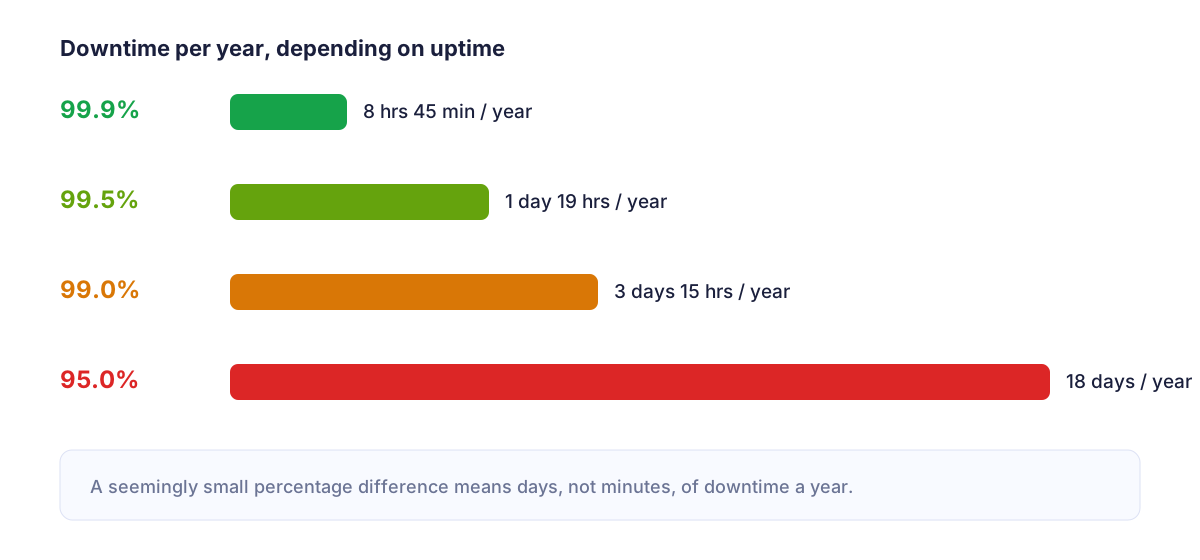
The problem is that seemingly high percentages still translate into a surprising amount of downtime per year:
- 99.9% uptime = about 8 hours 45 minutes of downtime per year,
- 99.5% uptime = about 1 day 19 hours of downtime per year,
- 99.0% uptime = about 3 days 15 hours of downtime per year,
- 95.0% uptime = about 18 days of downtime per year.
Many site owners are confident their host offers "99.9% guaranteed uptime" — and even if that's true, it still allows for almost 9 hours of potential downtime. The real question is: will you find out about it in real time, or only from a report at the end of the month?
How does Google treat an unavailable website?
Googlebot regularly visits your site to crawl and index it. When it hits server errors (5xx codes) or a site that doesn't respond at all, a few things happen:
- Crawl budget gets wasted — Googlebot bounces off unavailable pages instead of indexing new content.
- Short, isolated outages usually aren't a big deal — Google simply retries later.
- Repeated or prolonged downtime can lead to a temporary ranking drop, and in extreme cases, pages being dropped from the index if Google concludes the site is unreliable or abandoned.
In other words: a single 10-minute blip isn't the end of the world. But a site that goes down several times a week sends Google a clear signal — this site is unreliable.
Uptime, user experience, and (indirectly) rankings
Google has long emphasized user experience (UX) as a ranking factor. A site that occasionally fails to load, or loads very slowly right before going down completely, generates:
- a higher bounce rate (users go straight back to the search results),
- shorter time on site,
- fewer returning visitors and fewer backlinks — because nobody links to a site that's regularly unreliable.
These behavioral signals act as an indirect, but very real, indicator of site quality to search engines.
The invisible side of uptime: SSL and domain expiry
When talking about availability, it's easy to forget two things that "switch off" a website just as effectively as a server crash:
- An expired SSL certificate — the browser shows a "Your connection is not private" warning, and most users will leave immediately. For Google, this is also a signal of a security problem with the site.
- An expired domain — the site disappears overnight, often with no advance warning visible to the owner.
Both of these scenarios are 100% predictable — certificates and domains have known expiry dates — yet they regularly catch businesses off guard simply because nobody is monitoring those dates automatically.
The real cost of downtime
For an online store, an hour of downtime is directly lost revenue. For a company website or blog, it means lost leads and newsletter signups — and, over time, weaker organic rankings that translate into less traffic for weeks after the incident. If you run a WooCommerce store, it's also worth reading why Jetpack alone isn't enough for full monitoring.
How to monitor (and improve) uptime
Best practice is external monitoring, independent of your hosting — because if the server goes down, a monitoring system running on that same server goes down with it. Effective uptime monitoring should:
- check your site every few minutes from external servers,
- verify not just whether the site responds, but also the HTTP status code and load time,
- track SSL certificate and domain expiry well in advance,
- send alerts through a channel you'll actually notice right away — SMS or Telegram, not just email that can be missed.
If you're wondering what this looks like in practice "from zero", start with How to Check If a Website Is Down: 5 Methods.
Monitor uptime, SSL and domain expiry in one place
MonitorWWW.com checks your site every 5 minutes and warns you in advance about an expiring SSL certificate or domain — before it affects your SEO and sales.
See plans and pricingSummary
Uptime is more than just "the site works or it doesn't". It's a metric that affects how Google evaluates your site's quality, how long users stay, and how much you sell. The best way to stop worrying about uptime is to stop checking it manually and let automated monitoring do that job for you.